Что нового в 1.7.1
1.7.1 brings back Clear and Remove in Dice Studio, adds 15 achievements, keeps your table edits yours, and fixes the Screen Time prompt.
- Dice Studio: Clear empties the roll list after you confirm. Remove, or a swipe to the left, takes one roll off it. Rolls made in dice mode stay in your Journal and the Adventure Log.
- Dice Studio and dice mode: The first time you open Dice Studio, a short sheet explains what it is for and where the dice mode key is. To list only Studio test rolls, turn off Show Adventure Log rolls in Dice Studio settings.
- Achievements: Earn 25 achievements in Game Center, 15 of them new. Turn on Game Services in Settings, then tap View Achievements to see them.
- Your tables: The app never replaces a built-in table you changed. If you changed a table's file in your storage folder and an update changes that table, Table Management in Settings asks whether to keep yours or use the new version, and a dot marks Settings until you choose. Random Events keep working meanwhile.
- iPhone and iPad: With a Screen Time passcode, the app no longer asks for the passcode and an age range at every launch.
- Fixes: Use the App's Version in Table Management works again. A roll made as the app returns from the background stays in the Adventure Log. Changing the storage folder no longer fails on your saved formulas. On Mac, a storage folder you choose stays usable after you restart the app. Scene summaries match the Adventure Log's font. Navigation icons on iPad and Mac show in dark mode with Focus Mode on. Primary keys show a clear focus ring.
- Tables and Help: Search finds tables by their name in your language. Traditional Chinese shows Traditional category names. The Crucial Characters entry in Campaign Elements is corrected. Dice Help's Savage Worlds example shows a trait roll with a Wild Die.
Официальное описание
Transform your roleplaying experience with the official Mythic Game Master Emulator 2nd Edition companion app. Designed for solo players, GM-less groups, and Game Masters alike, Mythic GME Mobile brings the power of the Mythic system to your fingertips. The core Mythic GME 2e rules, including every Meaning Table and Event Focus Table from the rulebook, come with the app.
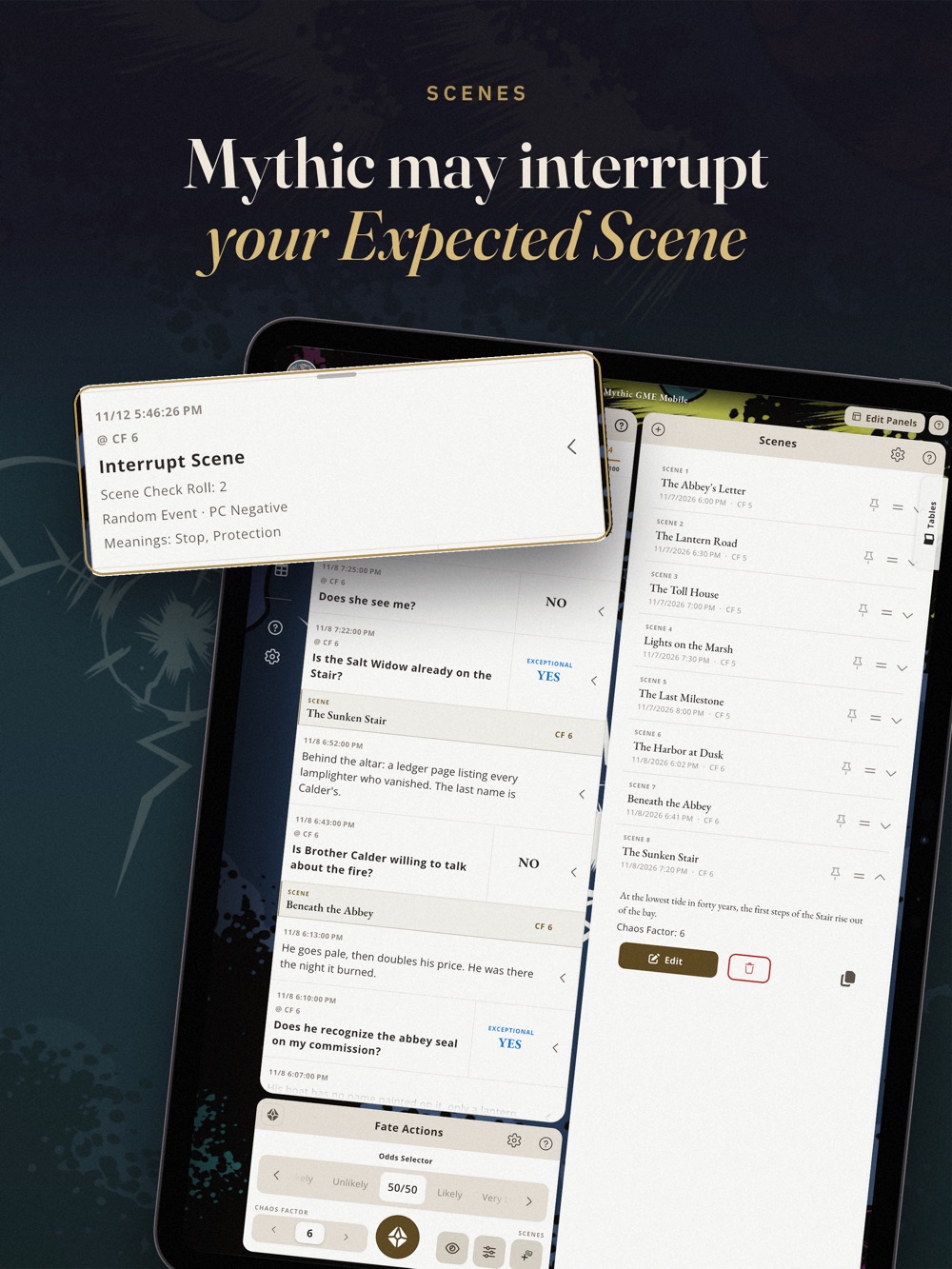
Mythic is a narrative engine that answers your questions and drives the story. Picture the Scene you expect, and Mythic may alter it or interrupt it with something unexpected. Ask yes-or-no questions as you would ask a Game Master, and the answer, which can be an Exceptional Yes or No, goes into your Adventure Log. Random Events crop up and push the story in new directions, and the Meaning Tables give you a couple of words to interpret.
Ask and roll
• Set the Odds and roll on the Fate Chart, or use Fate Check.
• Prompt for Question Before Roll keeps your question with its answer.
Scenes that do not go to plan
• The Chaos Factor rises as things get out of control and falls as your characters take control. Higher chaos brings more Altered and Interrupt Scenes and Random Events.
• Prepared Adventures let you play pre-written adventures with Mythic.
Meaning when you need it
• 55 tables come with the app. Search, favorite and filter them by tag.
• Random Events can roll Event Meaning for you.
Your campaign in one Journal
• Threads, Characters and Features lists with notes and random list rolls.
• Multiple Journals with Scene Summaries and Markdown notes, with spell check.
• Export Journals as JSON or Markdown, and import JSON Journals.
3D dice and Dice Studio
• Fate rolls, table rolls and most dice formulas roll 3D dice with sound. Throw from Roll, or pick up a die and toss it.
• Exceptional answers, Random Events and Interrupt Scenes end in slow motion. You can turn the animation off.
• Dice Studio formulas support keep and drop, exploding dice, success counting, D66 and labeled pools in their own colors.
New in 1.7.0
• 3D dice with sound and slow motion, colored dice labels, and Push from the Adventure Log
• Progress Points for Meaning Tables
• Custom Lists (Expanded Features)
• 30 Mythic Magazine tables from issues 63 to 71 (Expanded Features)
• Rebuilt Adventure Log, corrected dark mode in all 10 themes, and 18 new Help articles
• Roll built-in tables in German, Spanish, Italian, French and Chinese
On iPhone and iPad
• A Tables tab on the Fate Chart screen opens Meaning Tables and Event Focus.
• On iPad, Edit Panels lets you arrange your workspace the way you play and undo any change.
• Shake to undo restores deleted log entries, Scenes and Custom Tables, and cleared lists.
• iCloud Sync for your Journals.
• Game Center achievements on iPhone, off until you turn them on.
• An Apple Watch app (watchOS 26.2 or later) lets you roll on the Fate Chart and see Random Events on your wrist.
• Screen reader labels, system text size, three contrast levels, Colorblind Mode with six options, and Left Handed Mode on iPhone. 3D dice follow Reduce Motion.
Expanded Features
The Expanded Features in-app purchase adds Custom Lists, Custom Tables, Hybrid Play, Progress Tracks, Discovery Check, Keyed Scenes, and 211 more tables, for 250 Meaning Tables and 16 Event Focus Tables.
One purchase unlocks every expanded feature available now, plus any released in the 365 days after you buy. Everything you unlock stays unlocked. Features released after that need a new purchase. Restore with the same Apple Account. No subscriptions.
Privacy and languages
You can play offline, and Journals live on your device. iCloud Sync, achievements and purchases need a connection. Error reports never include Journal content. Usage sharing stays off until you turn it on. English and Portuguese are official translations. Spanish, French, Italian, German and Chinese are unofficial.
Mythic GM Emulator 2nd Edition is by Tana Pigeon and Word Mill Games. We recommend reading the rulebook first.