DoF Viewer

5,0 (1 · RU) · 3,7 (7 · US)

Разработчик
Arnaud Kerckhoeve
Устройства
Вышло
28.03.2011
Текущая версия
4.0 (15.11.2026)
Требует iOS
18.0
Размер
2 МБ
Языки
EN, FR

О приложении

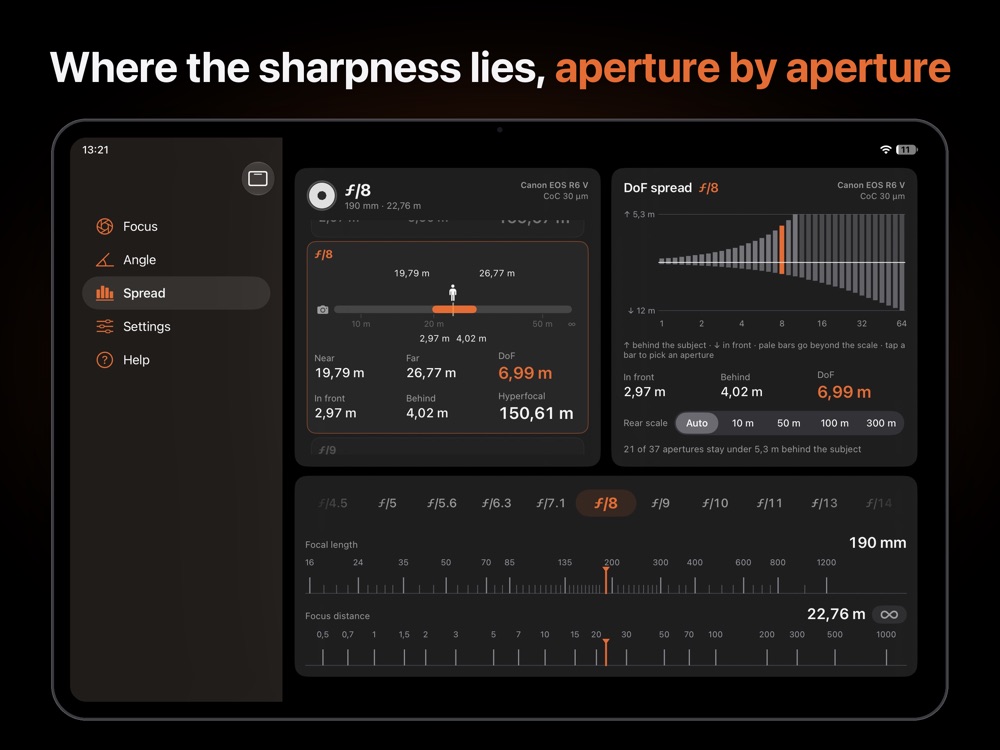
DoF Viewer computes and shows your camera's depth of field at a glance. Pick your camera among more than 670 digital bodies and the classic film formats, set the focal length and focus distance, then scroll through the apertures. FOCUS • One box per aperture: drag up or down to move from one to the next. • Sharpness ruler with the subject, near and far limits, depth of field in front of and behind the subject. • Hyperfocal distance. BACKGROUND BLUR • Blur size against distance, compared with the circle of confusion. • Blur at infinity, to judge how the background will render.

349 ₽
Открыть в App Store

Скидок пока не было — следим за ценой с 23.11.2026

История цены

23.11.2026349 ₽

Цена проверена 10 мин назад

Что нового в 4.0

DoF Viewer has been rebuilt from the ground up for iOS 18. • Focus: one box per aperture, as in DoF Viewer 3.1. Drag up or down to move from one aperture to the next and read the sharpness ruler, near and far limits, depth of field and hyperfocal distance. • Background blur: a chart of the blur size against distance, with the sharpness limit. • Angle: framing to scale with a reference object (flower, face, person, car, tree, building), landscape or portrait, and the share of the picture it fills. • Spread: depth of field in front of and behind the subject for every aperture; tap a bar to pick an aperture. • More than 670 digital cameras and 10 film formats, with search, recents and custom cameras. • Expert mode: circle of confusion computed from print size, viewing distance and visual acuity. • On iPad: side-by-side views in landscape and a four-view grid in portrait. • Built-in help, English and French, metric or imperial units

Официальное описание

DoF Viewer computes and shows your camera's depth of field at a glance. Pick your camera among more than 670 digital bodies and the classic film formats, set the focal length and focus distance, then scroll through the apertures. FOCUS • One box per aperture: drag up or down to move from one to the next. • Sharpness ruler with the subject, near and far limits, depth of field in front of and behind the subject. • Hyperfocal distance. BACKGROUND BLUR • Blur size against distance, compared with the circle of confusion. • Blur at infinity, to judge how the background will render. ANGLE OF VIEW • Horizontal, vertical and diagonal angles, and the field covered at the focus distance. • Framing to scale with a reference object: flower, face, person, car, tree or building. • Landscape or portrait picture. SPREAD • Depth of field in front of and behind the subject for every aperture, on one chart. • Tap a bar to pick an aperture. FOR DEMANDING USERS • Expert mode: circle of confusion computed from print size, viewing distance and visual acuity. • Warning when the requested sharpness is finer than the sensor can resolve. • Custom cameras. • Aperture scale in full, half or third stops. • Metric or imperial units. On iPad, views sit side by side in landscape and in a four-view grid in portrait. Built-in help in English and French, light or dark mode. No ads, no account, no data collected.

Похожие приложения

y2kamФото и видео
49 ₽
VideditФото и видео
15 ₽